Calibration and test equipment management: the successor to MET/TEAM®
Every instrument.
Every calibration.
All in view.
Instruments, due dates, calibration jobs and records in one place.
LABIONIX replaces MET/TEAM®, starts MET/CAL® and MET/CONNECT® procedures directly from the job and runs on your own server.
- For calibration labs and equipment managers
- Developed in Germany

Replaces MET/TEAM®.
Compatible with MET/CAL® and MET/CONNECT®.
MET/TEAM® end of life
MET/TEAM® ends on 31 December 2026.
LABIONIX is the successor: it works with your MET/TEAM® database, with no export and no import, and starts MET/CAL® and MET/CONNECT® directly from the job.
01/Everything in one place
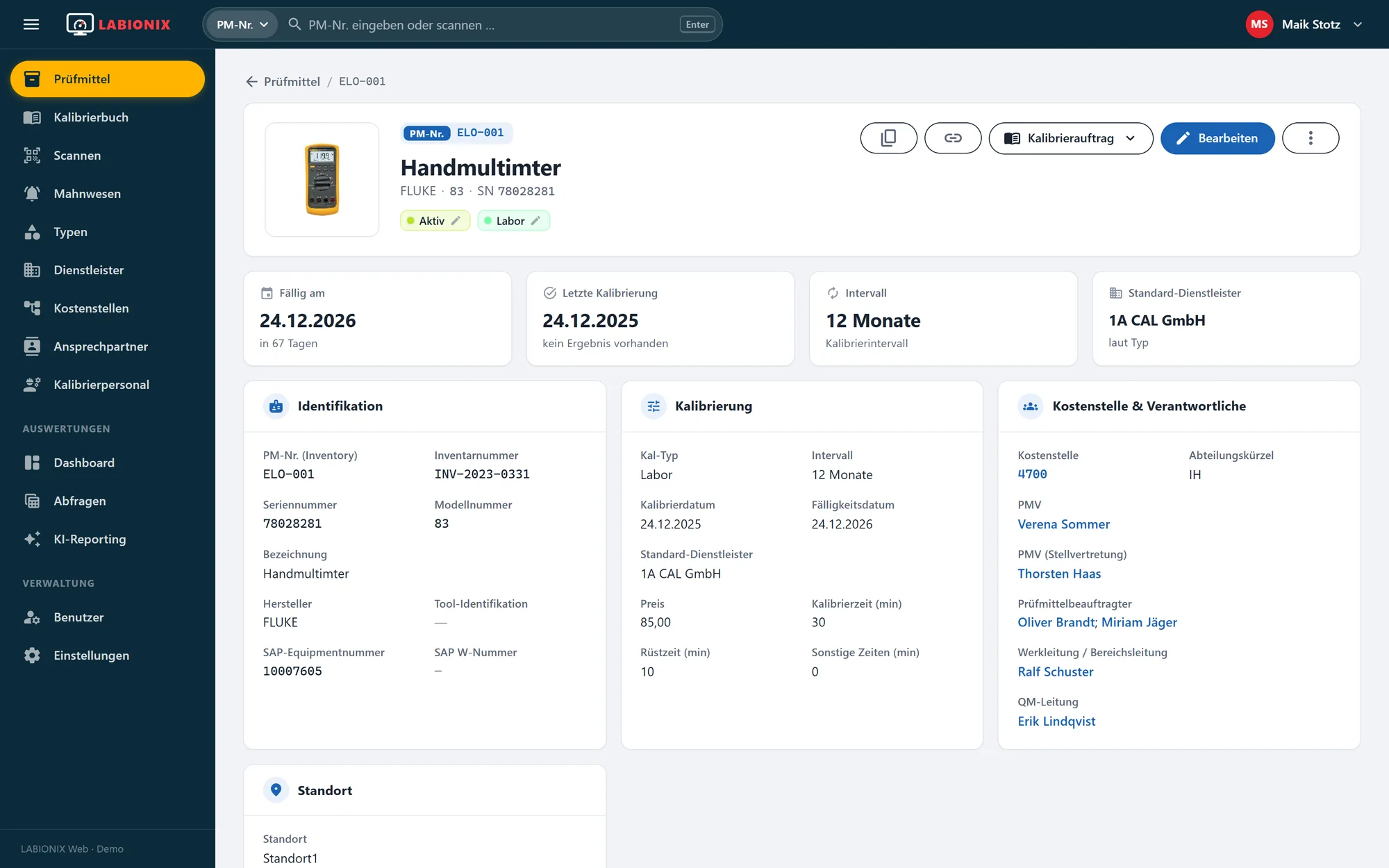
Every instrument clearly organised
Master data, serial number, SAP number, location, cost centre and responsible people: in LABIONIX every instrument has its own file. Statuses such as active, defective or locked are visible at a glance.
Documents, pictures, calibrations and the complete history are attached directly to the instrument. The quick search finds any instrument by equipment number, serial number or scan.
- Status, location, cost centre
- Files and pictures on the instrument
- Complete history
02/Never miss a due date again
Due dates and calibration intervals in view
Overdue instruments are shown in red in the list, and the dashboard shows the due dates of the next twelve months. So you plan calibrations before they become a problem.
Calibration intervals are defined per type. Key figures such as overdue, due within 30 days or open jobs can be filtered by site and extended with your own tiles.
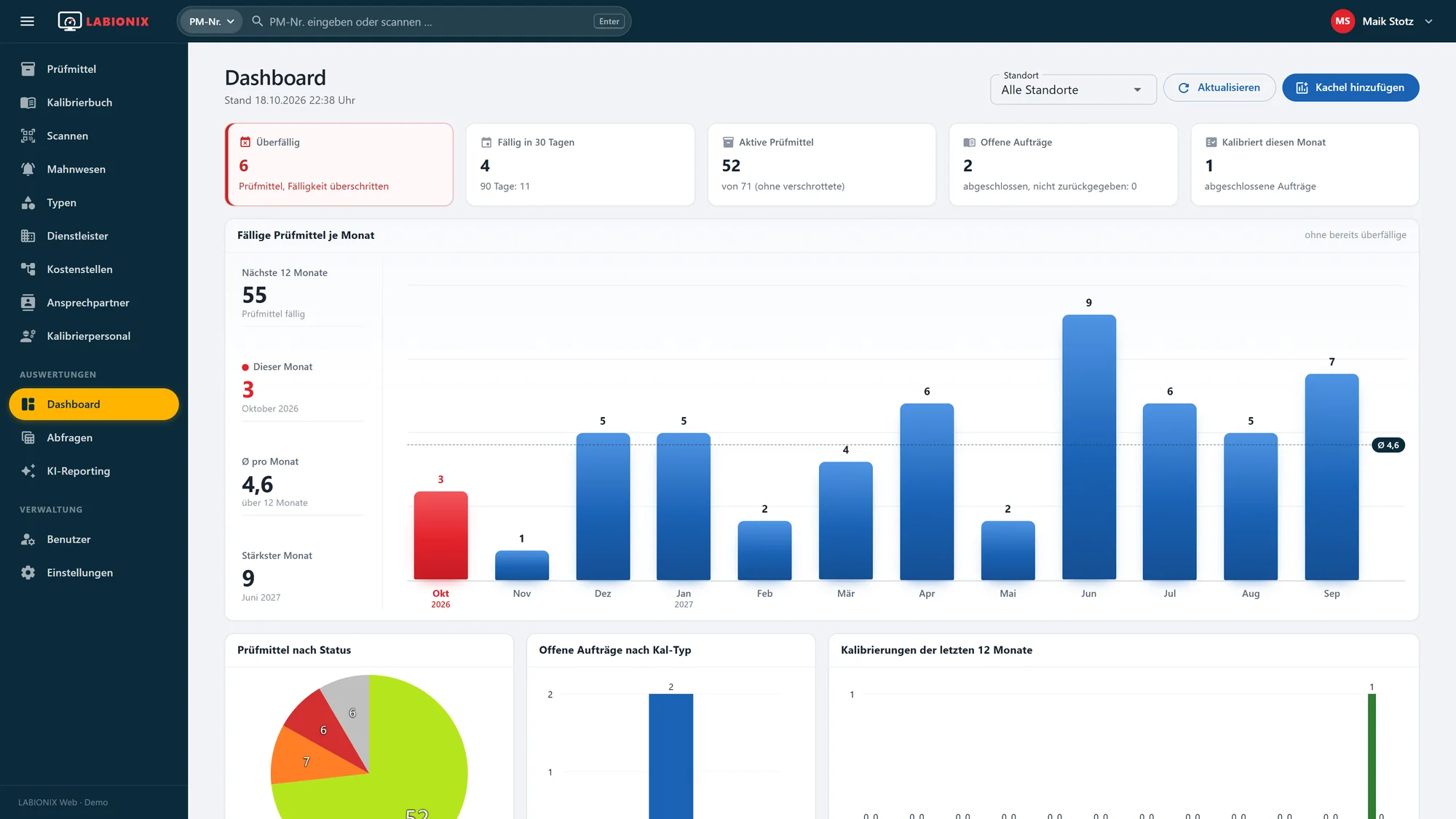
- Overdue immediately visible, marked red
- Due within 30 days with a 90-day preview
- Open jobs by site and calibration type
- Due per month twelve months ahead
03/How it works
From receipt to calibration certificate
Three steps that repeat in everyday lab work.
LABIONIX guides you through each of them.
-
01
Record
Create or clone an instrument, assign type and calibration interval, attach the QR label. LABIONIX keeps using existing MET/TEAM® data directly.
-
02
Scan and calibrate
Record the receipt by scan, the calibration job is created automatically. Calibrate in your own lab with MET/CAL® or MET/CONNECT®, started directly from LABIONIX, or externally at a service provider.
-
03
Document and evaluate
Calibration certificate as PDF, risk assessment for deviations, e-mail to the responsible people. Dashboard, queries and AI reporting deliver the evaluation.
04/Scan instead of search
Through the lab day by QR code
Receipt, hand-out and external shipping run through the scanner: scan the equipment number or QR code, collect a list, process it with one click. Each instrument gets a calibration job or a return.
Without a handheld scanner you use the camera of your smartphone. LABIONIX adapts to every screen size, from the workbench to the phone.
- Receipt, hand-out, external shipping
- Handheld scanner or phone camera
- Requested date and remark for all


05/Calibration log and jobs
From job to record
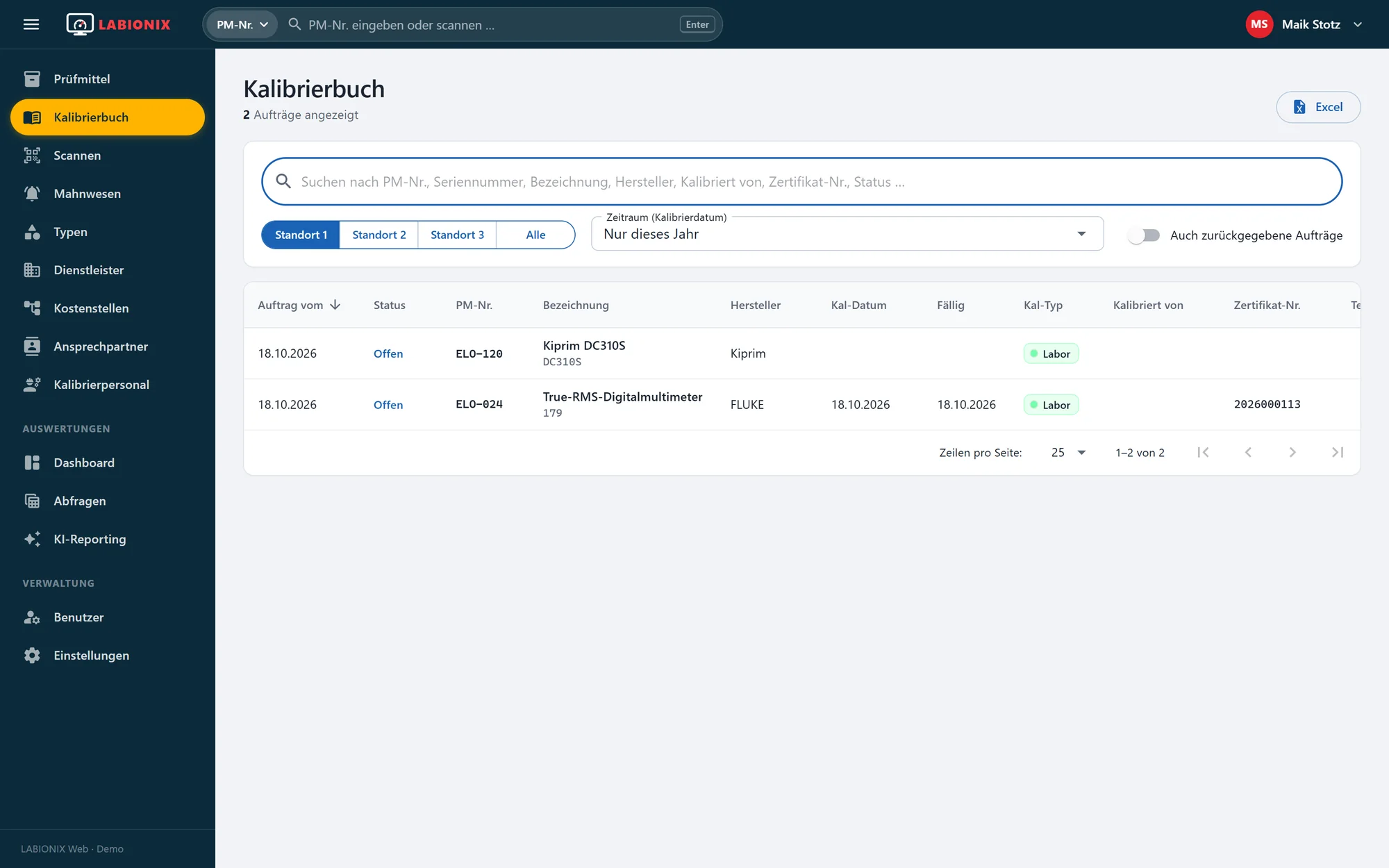
The calibration log keeps all jobs by site and period: open, completed, returned. Every job knows its measurements, results with tolerance charts, documents, e-mails and revisions.
On completion LABIONIX creates the calibration certificate, for deviations the risk assessment report, and sends both to the responsible people.
- Calibration certificate and cover sheet as PDF
- Tolerance charts per test point
- Revisions with justification
- Excel export of every list
06/Reminders that arrive
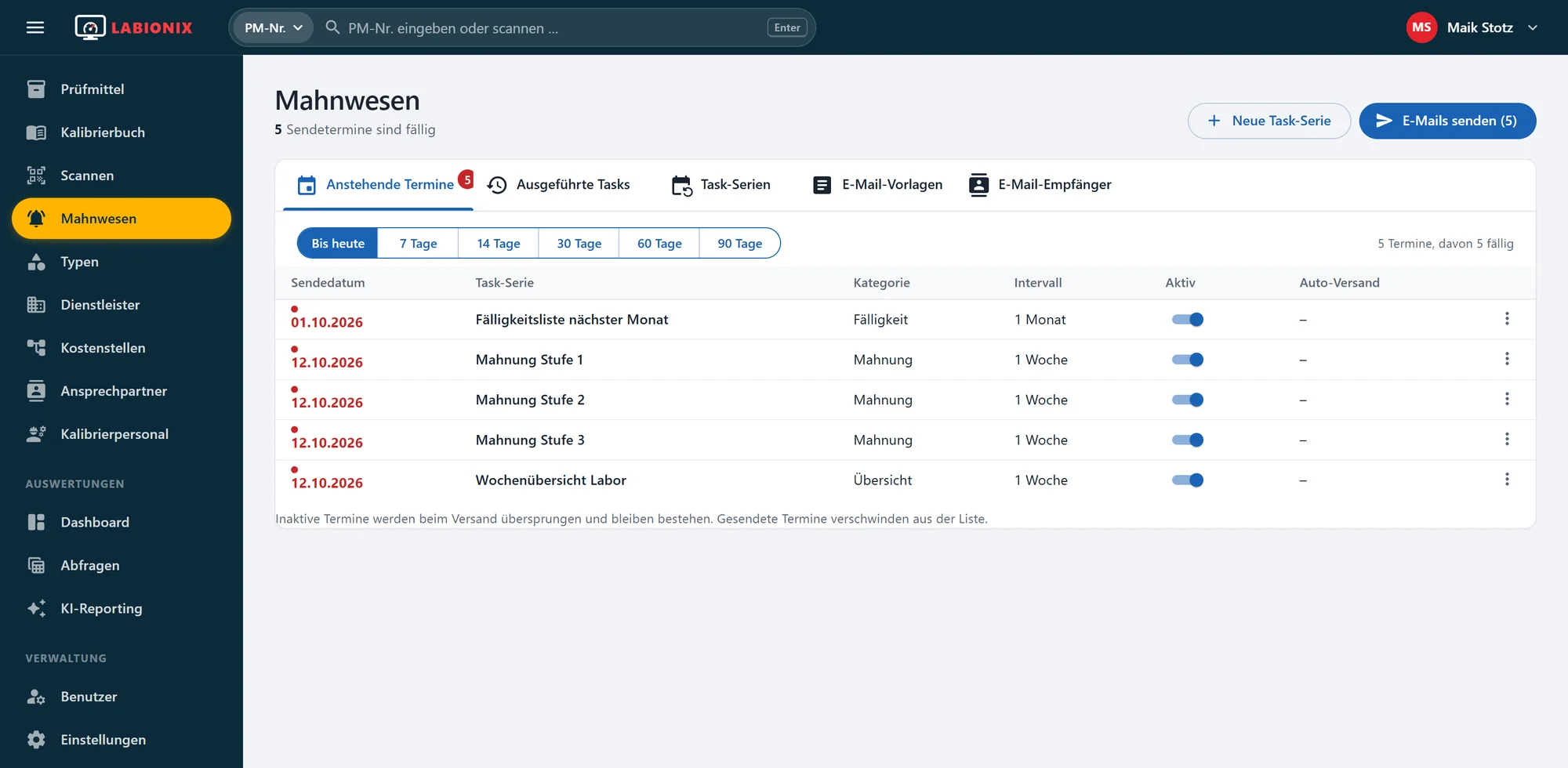
Reminders: automatic notices for instruments that are due
Task series send due-date lists, reminders in several levels and weekly overviews by e-mail, with freely designed templates and fixed groups of recipients.
You see upcoming dates before they are sent, and executed tasks remain traceable in the history.
- Reminder levels 1 to 3
- E-mail templates with placeholders
- Recipients per cost centre
07/MET/CAL® and MET/CONNECT®
Calibrate with MET/CAL®,
straight from LABIONIX
From the calibration job you start MET/CAL® or MET/CONNECT® with one click: LABIONIX hands over instrument, procedure and job data, and the procedure runs as usual.
Calibration procedures (PXE) are managed on the type, including approval and history. After the run, measurement results, tolerance charts and the calibration certificate are available in the job.
- Start MET/CAL® and MET/CONNECT® directly from the job
- Run the procedure, results land in the job
- Procedures (PXE) with approval and history
Start. Run the procedure. Take over the result.
MET/TEAM®, MET/CAL® and MET/CONNECT® are products of the Fluke Corporation.
08/More than a replacement
The alternative to MET/TEAM®, with more features
LABIONIX fully replaces MET/TEAM®: instruments, types, service providers, calibration jobs and records are all covered, and the cooperation with MET/CAL® and MET/CONNECT® is preserved. Your data stays where it is: LABIONIX works with the existing MET/TEAM® database, with no export and no import.
And LABIONIX does considerably more than MET/TEAM® offers:
-
In the browser instead of a client
Nothing to install, work on PC, tablet and phone.
-
Reminders
Due-date lists and reminder levels automatically by e-mail.
-
Scanning
Receipt, hand-out and shipping by QR code, even with the phone camera.
-
AI reporting and dashboard
Ask for evaluations in words, key figures per site.
-
Cost centres and responsible people
Who receives which e-mail? Defined per cost centre.
-
Risk assessment and documents
Reports, certificates and e-mails directly on the job.
09/Ask questions instead of writing queries
AI reporting: evaluate your instrument data in plain words
“Which instruments are due in the next 30 days?” Ask your question in words. The AI finds the matching data and shows the result as a table or chart.
Good evaluations are saved as tiles on the dashboard. For fixed reports there are saved queries and the Excel export.
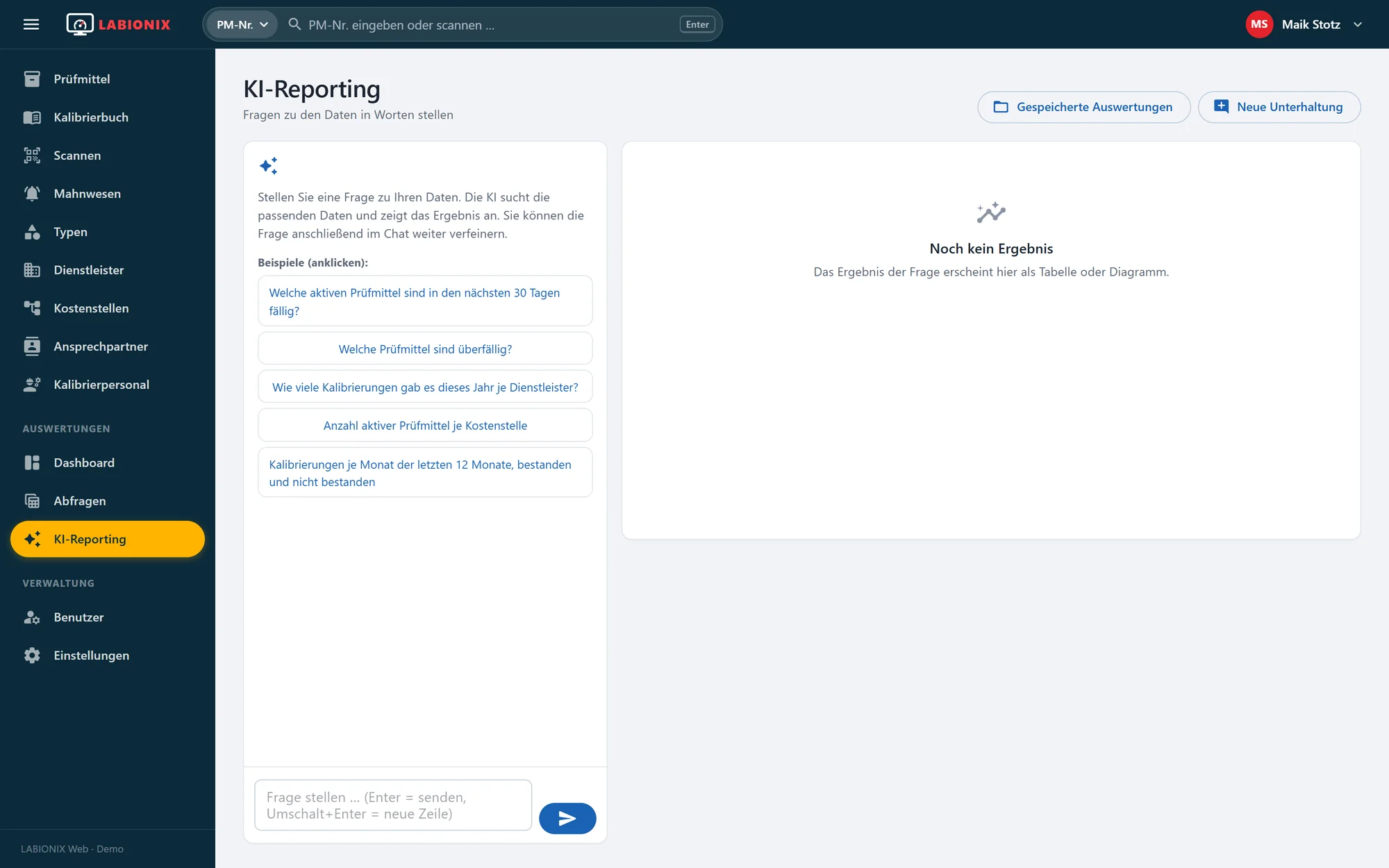
Example questions
- Which instruments are overdue?
- Number of active instruments per cost centre
- How many calibrations were there this year per service provider?
- Calibrations per month, passed and failed
10/Master data
Types, service providers, cost centres, people
Everything that belongs to an instrument is maintained and linked in LABIONIX.
-

Types
Manufacturer, model, interval, default service provider, procedures, pictures and documents per type. Changes apply to all instruments of the type.
-

Service providers
External calibration labs with accreditation, DAkkS number, documents and usage.
-

Cost centres
Equipment owners, deputies, equipment officers, plant and QM management per cost centre.
-

Calibration staff
Internal staff with qualification records and documents.
11/Your data stays with you
Calibration management on your own server, without the cloud
LABIONIX runs on your server in your own network. The data is stored in your SQL Server database, so instrument files and calibration certificates stay in house.
Nothing needs to be installed on the workstations: a browser is enough, on PC, tablet or smartphone. Users, roles and permissions are managed in LABIONIX.
Your network
In your own network · no cloud
12/Standards and audits
Ready for the next audit
ISO 9001 and ISO/IEC 17025 require monitored, traceable and documented test equipment. LABIONIX records status, due date, calibration record and history for every instrument.
Revisions are justified and stored traceably, and old documents remain available as previous versions. Evaluations for the auditor are ready in minutes.
-
Traceability
Calibration certificate, service provider and certificate number per calibration.
-
Accountability
History and revisions with date, user and justification.
-
Overview
Due-date lists and queries by site, cost centre and period.
LABIONIX supports you with the requirements of these standards. The implementation in your quality management remains in your hands.

13/Fields of application
Wherever test equipment is monitored
From electronics manufacturing to the calibration lab, as standalone calibration software or alongside your LIMS: LABIONIX grows with you, from a few dozen to many thousand instruments.
- 01Calibration laboratories
- 02Electronics manufacturing
- 03Quality assurance
- 04Research and development
- 05Maintenance
- 06Medical technology
- 07Automotive suppliers
- 08Test fields and test benches
- 09Metrology service providers
- 10Multiple sites
14/Experience from laboratory practice
Developed by experts
STOTZ-Software has been developing automation solutions and databases for laboratories since 2001. LABIONIX grew out of more than two decades of experience with test equipment management and calibration.
The manufacturer is also your contact: rollout, customisation and interfaces come from a single source.

Any questions?
Frequently asked questions about LABIONIX and MET/TEAM®
The most important answers about LABIONIX.
Ask us directlyDoes LABIONIX run in the cloud or on our premises?
On your premises. LABIONIX is installed on a server in your network and used in the browser. An outside connection is only needed for the optional AI reporting.
Do we still need MET/TEAM®?
No. LABIONIX can replace MET/TEAM® as your test equipment and calibration management. Your data stays where it is: LABIONIX works with your existing MET/TEAM® database, with no export and no import. History and records are preserved.
When does MET/TEAM® end?
According to Fluke, MET/TEAM® reaches end of life on 31 December 2026, and support ends on 31 December 2029. Dates, comparison and the migration process are on our page “MET/TEAM® end of life”.
Does LABIONIX work with MET/CAL® and MET/CONNECT®?
Yes. You start MET/CAL® and MET/CONNECT® directly from the calibration job, the procedure runs as usual, and the results are available in the job afterwards.
Is LABIONIX a LIMS?
LABIONIX specialises in test equipment and calibration management. For calibration labs it covers the tasks around instruments, calibration jobs, certificates and records that a LIMS would otherwise handle, and it works with MET/CAL® and MET/CONNECT®. An existing LIMS for samples and analyses can keep running alongside.
Which database does LABIONIX use?
Microsoft SQL Server. The data stays in your database and can be backed up as usual.
Can we take over existing instrument data?
Yes. MET/TEAM® data does not need to be migrated at all: it stays in your database and LABIONIX works with it directly. Lists from Excel or other systems are taken over by arrangement.
Does LABIONIX work on a smartphone?
Yes. The interface adapts to every screen size, and the QR scan uses the phone camera. So you record receipts and hand-outs right at the shelf or at the workbench.
How does an external calibration work?
Scan the instrument with “external shipping”, and the job with the default service provider is created automatically. After the return, the certificate, certificate number and result are recorded on the job.
What happens when a calibration fails?
LABIONIX creates the risk assessment report, the instrument receives a matching status such as locked or defective, and the responsible people of the cost centre are informed by e-mail.
Which records does LABIONIX produce?
Calibration certificates and cover sheets as PDF, risk assessment reports, QR labels for the instruments and Excel lists from every view and every saved query.
How are users and permissions managed?
Users are created in LABIONIX, with roles for administrators and users. Passwords follow rules, and a change can be enforced at the first login.
What does LABIONIX cost?
The price depends on the scope and the number of sites. Request a demo and we will get back to you with a quote that fits your equipment inventory.
The next due date is sure to come.
See LABIONIX with your own instruments.
Show us how you manage test equipment today. In an online demo we show how LABIONIX makes your everyday work easier.